Billing & plans
Understand ObligoBoard's pricing plans, manage your subscription, and learn how the free trial works.
ObligoBoard offers flexible pricing plans for teams of all sizes. Manage your subscription from Settings → Billing.
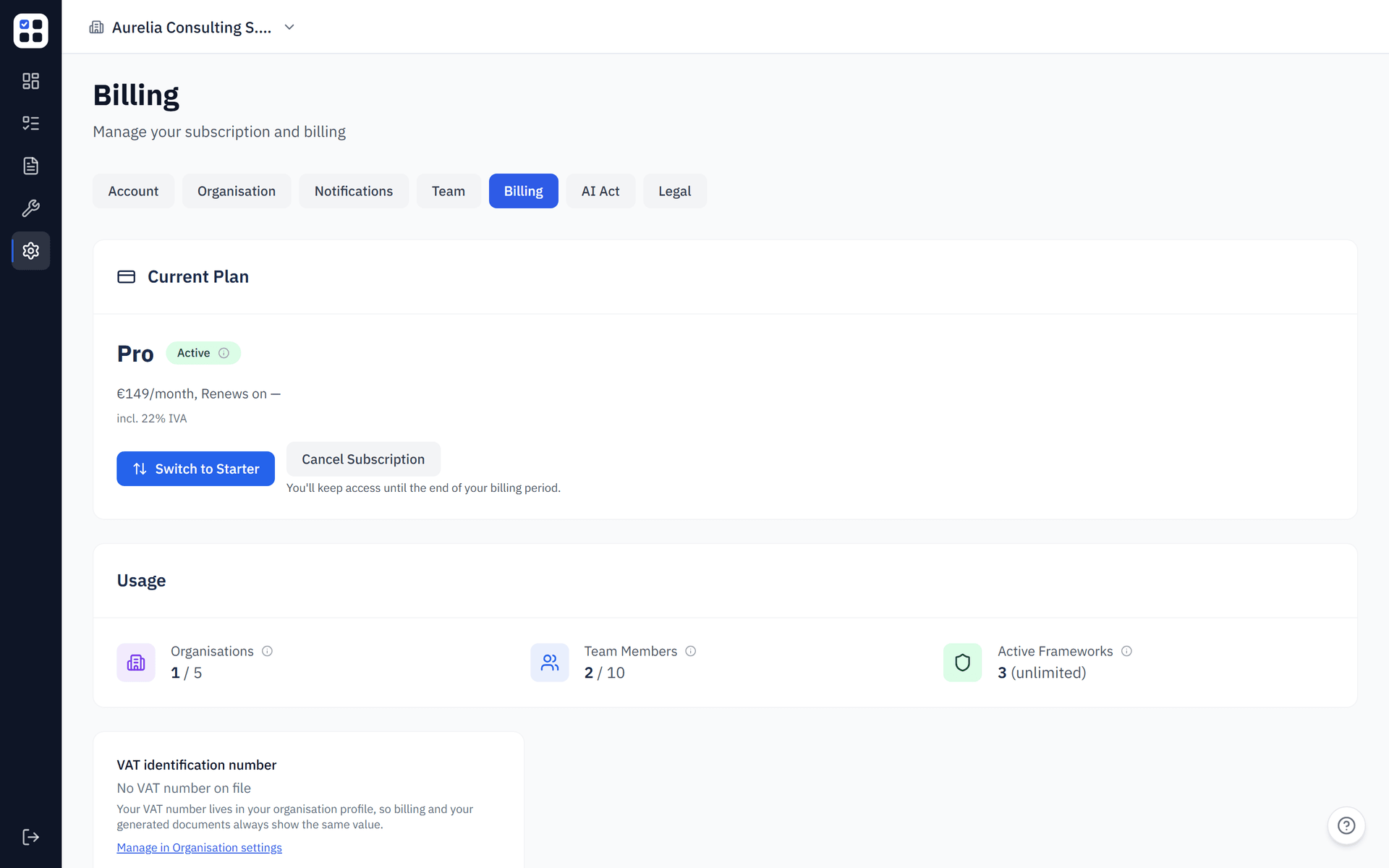
Plans
Free trial
All new accounts start with a 14-day free trial that includes access to all Pro features — no credit card required. At the end of the trial, you can choose a plan or your account enters read-only mode.
Starter
Ideal for small teams getting started with compliance.
- Up to 5 team members
- Up to 1 compliance framework
- Evidence Pack generation
- Email notifications
- Standard support
Pro
For growing teams with multiple frameworks and larger compliance footprints.
- Up to 5 organisations
- Up to 10 team members per organisation
- All available compliance frameworks
- Evidence Pack generation
- Email notifications
- Priority support
- Advanced reporting (coming soon)
Plan comparison
| Feature | Starter | Pro |
|---|---|---|
| Your own organisations | 1 | Up to 5 |
| Team members per organisation | 5 | 10 |
| Compliance frameworks | 1 | All available |
| Obligations | Unlimited | Unlimited |
| Evidence uploads | Unlimited | Unlimited |
| Evidence Pack generation | Yes | Yes |
| Privacy Policy Generator | Yes | Yes |
| Cookie Policy Generator | Yes | Yes |
| Cookie scanning | -- | Yes |
| Priority support | -- | Yes |
| Custom branding on exports | -- | Yes |
All plans are billed monthly. Annual billing with a discount is on the roadmap.
Upgrading your plan
Go to Settings → Billing
Click Settings in the sidebar, then select the Billing tab.
Click 'Upgrade'
Choose the plan you want and click Upgrade.
Complete checkout
You'll be redirected to a secure Stripe checkout page. Enter your payment details and confirm.
Confirmation
After payment, your plan upgrades immediately and the Billing tab shows your new plan status.
Businesses in the EU and UK go through a VAT ID check at checkout — a valid EU VAT ID is reverse-charged (0% Italian VAT), Italian businesses are charged 22%, and UK businesses are outside the EU VAT scope. See B2B VAT gate for how the check works and what to do if your VAT ID or country is rejected.
Managing your subscription
From Settings → Billing you can:
- View your current plan and renewal date
- Upgrade or downgrade your plan
- Update payment method — via the Stripe customer portal
- Download invoices — all past invoices are available in the Stripe portal
- Cancel subscription — your account returns to read-only mode at the end of the billing period
To access the Stripe customer portal, click Manage billing on the Billing settings page. This opens Stripe's secure portal where you can manage all payment details.
Founders discount
Use the code FOUNDER50 at checkout to receive 50% off, every month, for the lifetime of your Pro subscription. This founding-member offer is available for a limited time.
Downgrading from Pro to Starter takes effect at the end of your current billing period — until then, you keep full Pro access. It does not delete data, but if you exceed the Starter limits (organisations, team members, or frameworks), ObligoBoard blocks access to the app and redirects you to the plan enforcement wizard, where you choose which organisations, members, or frameworks to deactivate or remove before you can continue. See Plan limit enforcement for the full enforcement flow.
Trial expiry
When your trial expires:
- Your account enters read-only mode — you can view obligations and reports but cannot make changes
- A banner appears on every page prompting you to choose a plan
- Your data is retained for 90 days after trial expiry — choose a plan within that window to restore full access exactly as you left it
Upgrading from a read-only state immediately restores full access — all your data is preserved.
Read-Only Mode
After your trial expires or your subscription lapses, your account enters read-only mode. You can still view your dashboard, obligations, and evidence, but you cannot make changes.
Subscribe to a plan (or reactivate your subscription) to restore full access -- your data is preserved throughout.
Data Retention After Cancellation
Your data is retained for 90 days after cancellation. During this period you can reactivate your account and everything is restored exactly as you left it.
After 90 days, data is permanently deleted per the retention policy. If you think you might return, reactivate before the retention window closes.
Invoices and receipts
All invoices are managed through Stripe. To download an invoice:
Go to Settings → Billing
Navigate to the Billing tab in Settings.
Click 'Manage billing'
This opens the Stripe customer portal in a new tab.
Go to 'Invoice history'
In the Stripe portal, find the invoice history section and download any past invoice as a PDF.