Organisation profile
Your organisation profile is the single source of truth for the Privacy Policy and Cookie Policy generators — what each field feeds, how country maps to your supervisory authority, what blocks generation, and what marks a generated policy out of date.
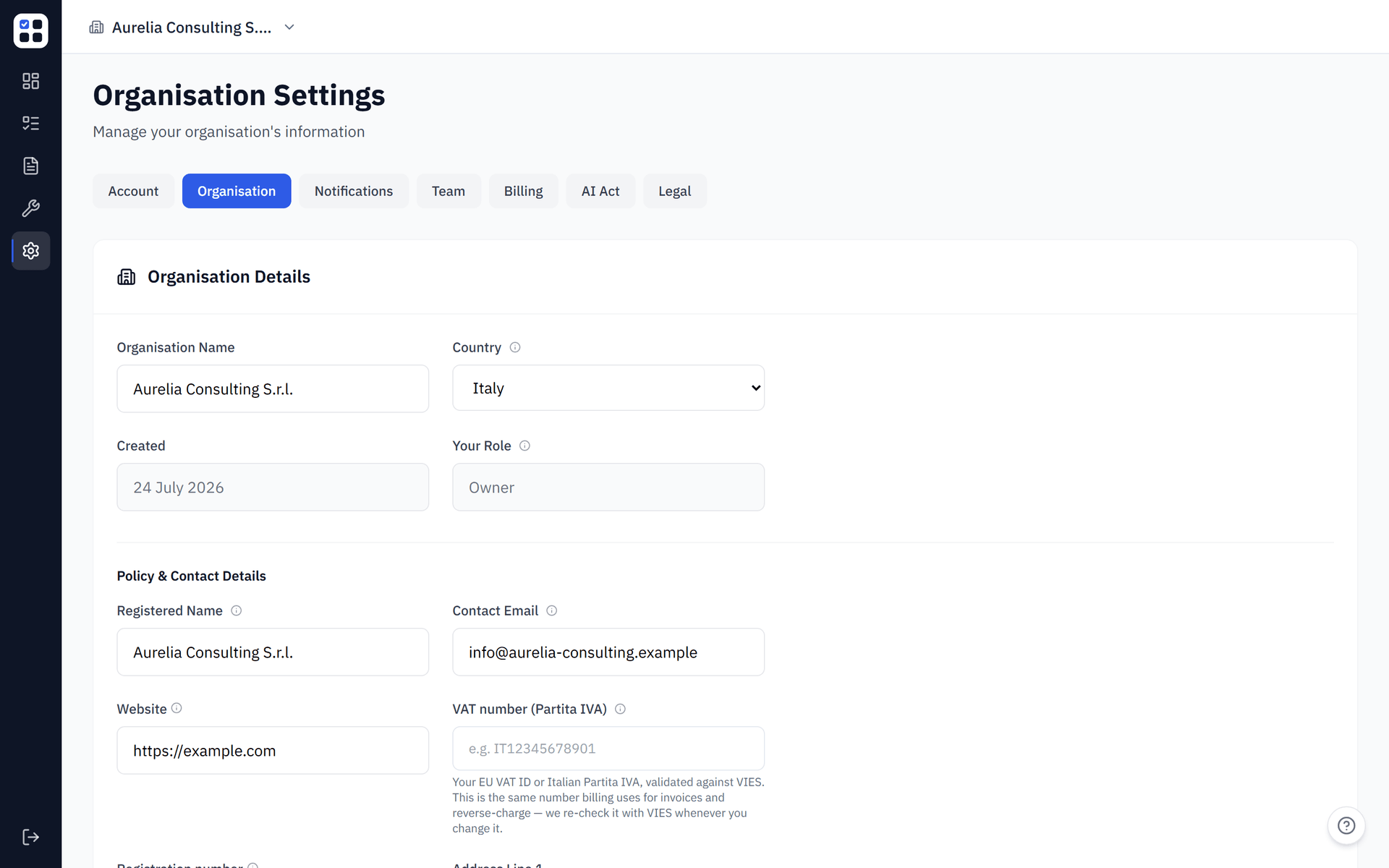
Every generated Privacy Policy and Cookie Policy is rendered from a single place: your organisation profile, at Settings → Organisation. There is no separate policy-details form on either generator — the generators read your profile directly, so a correct profile produces a correct policy, and an incomplete or stale profile produces a wrong or blocked one. This page is the field-by-field guide to keeping that profile right.
Only organisation and agency admins and owners can edit the organisation profile; other members see the fields as read-only. The profile is also where you re-seed obligations and retake the risk assessment, covered separately under Account & Organisation Settings.
Why it matters
The two policy generators do not ask you for controller details, data categories, or your supervisory authority at generation time. They pull all of it from your organisation profile. That design has a direct consequence: the profile is the upstream cause of every generated policy.
- A complete, current profile renders a correct Privacy Policy and Cookie Policy with no missing-field gate and no out-of-date banner.
- An incomplete profile trips the Privacy Policy's missing-fields gate and blocks generation until you fill the required fields.
- A stale profile — edited after a policy was generated — surfaces an out-of-date banner on the Privacy Policy the next time you open it, with a one-click regenerate.
- A country mismatch between your declared country and the country implied by your registered address blocks the save until you correct it or acknowledge the discrepancy.
Filling the profile once and keeping it current is the single highest-leverage settings task in ObligoBoard.
Field-by-field
The profile fields fall into five groups. Most map to specific sections of the generated policies; the billing group instead feeds your invoices.
Controller identity
These fields identify the data controller in your Privacy Policy and your organisation in your Cookie Policy.
| Field | Privacy Policy output | Cookie Policy output |
|---|---|---|
| Registered name | Data Controller section (required — the generator blocks without it) | Organisation name in the intro and Contact section (falls back to organisation name if blank) |
| Address line 1, line 2, city, postal code | Registered address line in the Data Controller section | Not used |
| Registration number | Registration number line in the Data Controller section | Not used |
| Contact email | Data protection contact line, and the contact address for rights requests | Mailto link in the Contact section (omitted if blank) |
| Website | Website line in the Data Controller section | Seed URL for the cookie scan (scan disabled if blank) |
Data Protection Officer
| Field | Privacy Policy output | Cookie Policy output |
|---|---|---|
| Has a DPO (toggle) | Gates the entire Data Protection Officer section | Not used |
| DPO name | Name line in the DPO section (only shown when the toggle is on) | Not used |
| DPO email | Email line in the DPO section (only shown when the toggle is on) | Not used |
When the DPO toggle is off, the DPO name and email fields are hidden and the DPO section is omitted from the Privacy Policy entirely.
Risk profile
These fields feed your Privacy Policy. Most drive its conditional sections; business type is required to generate at all but is not itself rendered in the policy body. They are read-only on this page — to change them, retake the risk assessment (see Risk Assessment & Scoring). The one exception is data categories, which you can update here directly.
| Field | Privacy Policy output | Cookie Policy output |
|---|---|---|
| Data processing role | Labelled line in the Data Controller section | Not used |
| Business type | Required for generation (the gate blocks without it); not rendered in the policy body | Not used |
| Data categories | "Data We Collect" table; gates the special-category and children's-data sections | Not used |
| International transfers | Gates the International Data Transfers section | Not used |
| Automated decision-making | Gates the Automated Decision-Making section | Not used |
| Public-facing website | When off, the website field is cleared on save, so no stale URL leaks into the generators | Same guard applies |
Two further fields — retention periods and third-party processors — also render in your Privacy Policy (the Data Retention and Third-Party Processors sections). They are part of the single source of truth but currently have no edit field on this page; if either is empty, the Privacy Policy shows a "not specified" fallback or omits the section. This is a known gap and will gain an edit path in a future release.
Organisation name and country
- Organisation name is your workspace's display name — it appears on the dashboard, evidence packs, and as the fallback controller name when no registered name is set.
- Country determines your supervisory authority (see the next section) and, separately, which compliance frameworks are available to you.
Changing your country does not automatically add or remove compliance frameworks. You will need to retake the assessment or adjust your frameworks after a country change. See Risk Assessment & Scoring.
Billing and e-invoicing (VAT & SdI)
These fields do not appear in your Privacy Policy or Cookie Policy — they feed your invoices. They live on the organisation profile so you can keep them current in one place; the VAT field shares the same value the checkout flow uses.
| Field | What it does |
|---|---|
| VAT number (labelled Partita IVA for Italian orgs) | Your VAT identification number. This is the same vat_id used at checkout — there is no second VAT field. On save it is normalised and validated against the EU-27 + UK allow-list and the VIES service, and a status chip shows whether it came back valid, unavailable, or unverified. The per-purchase professional-capacity warranty is not here — that stays in the checkout flow, because editing your profile is not a purchase. |
| Codice Destinatario (Italy only) | The optional 7-character SdI recipient code for Italian electronic invoicing (fattura elettronica). |
| PEC (Italy only) | The optional certified-email address (posta elettronica certificata) SdI can deliver invoices to. |
The Codice Destinatario and PEC fields appear only when your country is Italy. Both are optional and never block anything: if you leave them blank, invoices resolve to the standard 0000000 SdI fallback. When you provide a valid 7-character Codice Destinatario, it takes precedence — SdI only falls back to PEC when no code is on file.
Country to supervisory authority
Both generators derive your supervisory authority directly from your profile's country — there is no separate authority field to fill. ObligoBoard maps your country to its data protection authority where one is configured and renders that authority (with a link) in a Supervisory Authority section of both policies.
Twelve countries currently have a mapped authority: Italy (Garante), the UK (ICO), Germany (BfDI), France (CNIL), Spain (AEPD), the Netherlands (Autoriteit Persoonsgegevens), Belgium (APD), Austria (DSB), Ireland (DPC), Portugal (CNPD), Poland (UODO), and Sweden (IMY). If your country is supported but has no mapped authority, the Supervisory Authority section is omitted from the generated policies.
Country-change acknowledgement
Because the authority is derived from your declared country, ObligoBoard checks that your declared country and the country implied by your registered address agree. When you change your country or your address and the two disagree, the save is blocked and a modal shows the declared authority and the address-implied authority side by side. You then either:
- Go back and correct the country or address so they agree, or
- Acknowledge and save with a short rationale explaining the discrepancy.
The rationale is stored as an audit trail against your organisation. If you later bring the country and address back into agreement, the stored rationale is cleared.
The authority is always derived live from your current country at generation time — acknowledging a mismatch does not pin a different authority. If you acknowledge a discrepancy, the generated policy still uses the authority for your declared country.
What breaks if the profile is wrong
The Privacy Policy generator checks your profile before it generates and blocks with a clear list of the missing fields if any required value is absent. The Cookie Policy generator does not block on profile completeness — it omits the sections it cannot fill (for example, the contact link or the supervisory authority) rather than refusing to generate.
Privacy Policy required fields
To generate a Privacy Policy, these profile fields must be filled:
- Registered name
- Contact email
- Country
- Address line 1
- City
- Business type
- At least one data category
When any are missing, the generator shows an alert listing exactly which fields to complete, with a link straight to Settings → Organisation. Address line 2, postal code, registration number, the DPO fields, and the website are not required — the DPO section simply does not appear when the toggle is off.
Cookie Policy soft behaviour
The Cookie Policy has no missing-field gate. If your organisation name is blank, the intro uses a fallback phrase; if your contact email is blank, the contact link is omitted; if no authority maps to your country, the authority section is omitted. The cookie scan button is disabled until you set a website, because the scan needs a URL to target.
Updating and regenerating
Editing your organisation profile does not silently rewrite policies you have already generated — previous versions are preserved in the version history. Instead, the Privacy Policy generator tells you when a saved policy has fallen behind your profile.
The out-of-date banner
When you open the Privacy Policy generator, ObligoBoard compares the hash of your current profile against the hash recorded on your most recently saved policy. If they differ, an amber banner reads "Policy may be out of date" with a Regenerate button. Clicking it produces a fresh policy from your current profile and saves it as a new version.
The banner is driven by a hash of the fields that change the policy's content: data categories, international transfers, automated decision-making, public-facing website, country, data processing role, registered name, contact email, the DPO fields, retention periods, and third-party processors.
The banner is driven by a hash of the fields listed above. A few fields that do appear in your Privacy Policy — the address lines, postal code, registration number, and website — are not part of that hash. Editing them will change the policy text but will not trip the banner, so your saved policy can silently keep the old values. After editing any of those fields, open the Privacy Policy generator and regenerate explicitly to capture the change. Business type, organisation size, and data-subjects volume are not rendered in the policy at all, so editing them affects neither the text nor the banner.
Cookie Policy freshness
The Cookie Policy has no profile-change staleness banner. Its only freshness signal is the cookie scan age: if your last scan is more than 90 days old, a banner prompts you to rescan. See Cookie Scanner for the scan lifecycle.