Agency tier overview
What the ObligoBoard Agency tier is, who it's for, and how it differs from Pro — multi-client compliance management for advisors, fractional DPOs, and accounting firms.
The Agency tier turns ObligoBoard into a multi-tenant compliance workbench: one parent agency account that supervises any number of separate SME (sub-account) workspaces, each with its own obligations, frameworks, evidence, and team — and a single agency-level subscription that bills per active client.
This page is the entry point to the Agency-tier docs. For pricing and bracket math see Agency billing & slots. For provisioning your first sub-account see Agency setup.
Is the Agency tier for you?
The Agency tier is built for advisors who serve compliance to multiple clients in parallel:
- Commercialisti (Italian accounting firms) running GDPR / ESG / cookie-policy work for SME clients
- Fractional DPOs managing data-protection obligations across a portfolio
- Accounting and consulting firms that fold compliance into their service mix
- Boutique legal practices offering retained compliance support
- MSPs and IT consultancies that bundle compliance into a managed-services contract
If any of the following apply to your business, the Agency tier is the right home:
- You manage compliance for two or more separate legal entities that aren't all part of one corporate group
- You want one log-in that lists every client and their compliance status at a glance
- You need to bill the agency, not each client, and want volume pricing that improves as the practice grows
- You want clients to see your branding, not ObligoBoard's, on the workspaces they log into
- You sometimes need to invite a junior associate into a single client without giving them keys to the whole portfolio
If you only manage compliance for your own organisation (or a single corporate group of up to 5 entities), the Pro plan is a better fit.
What you get on the Agency tier
The Agency tier extends every Pro-tier capability and adds five categories of agency-only functionality:
- Multi-client dashboard —
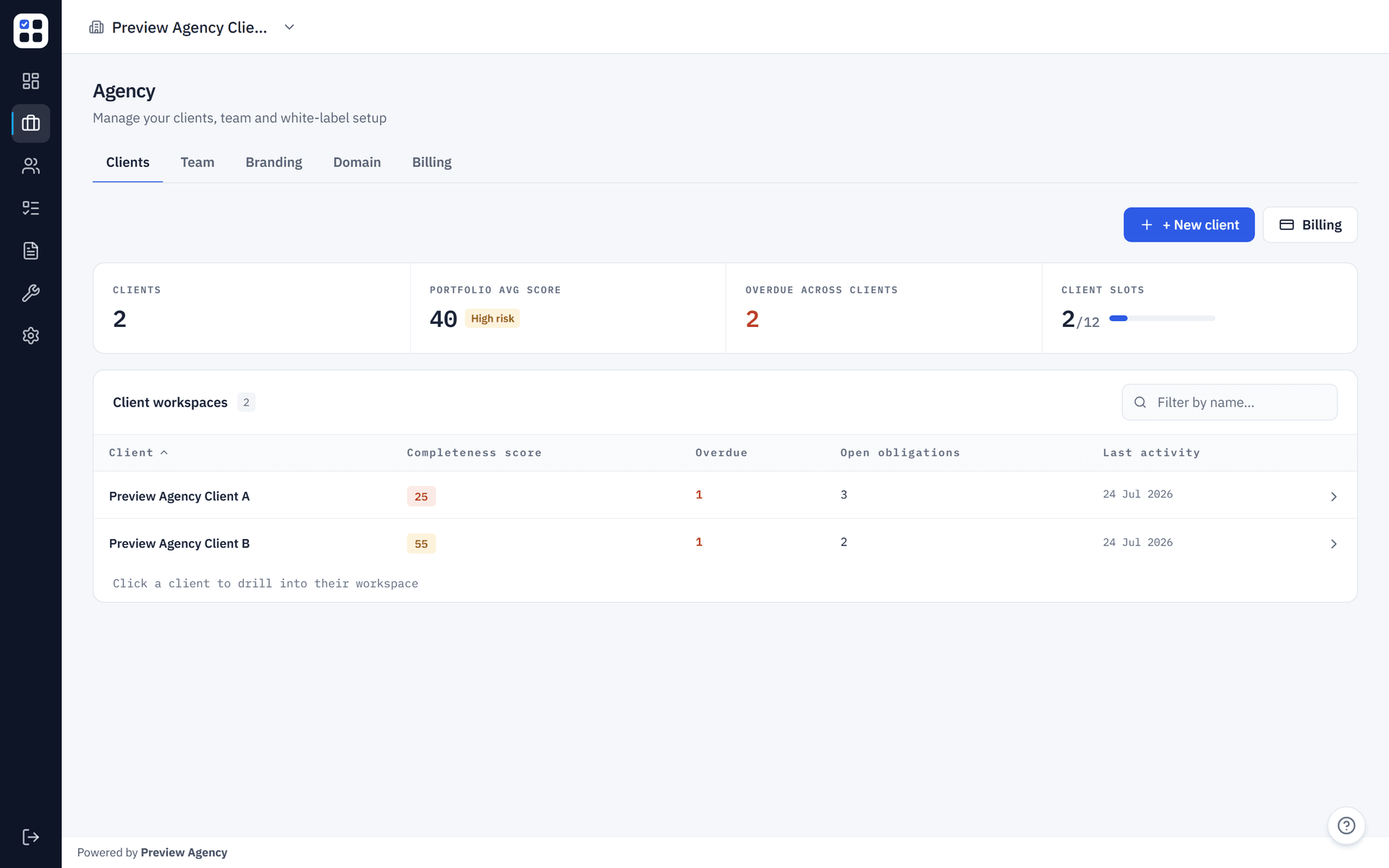
/agencylists every sub-account with a row per client showing overdue tasks, open obligations, and last activity. Click a row to drill into that client's workspace. - Sub-account provisioning — create a fresh ObligoBoard workspace for a new client in seconds, pre-filled with your agency's defaults (country, default framework). Documented in Agency setup.
- Agency-team controls — invite associates to your firm as
agency_adminoragency_member(per-client scoping is also supported via per-orguser_profiles). Theagency_ownerrole is the bootstrap role assigned to the account that creates the agency; it is not invitable through the team flow — ownership transfer is handled separately. - White-label branding — upload your firm's logo, set the primary brand colour, write a footer block, and (Agency Starter and up) point a custom domain at your sub-accounts. See White-label & custom domain.
- Volume-tier billing — one Stripe subscription priced per active client slot, with bracketed pricing that drops the per-slot rate as the practice grows. See Agency billing & slots.
Agency tier vs Pro
| Capability | Pro | Agency Starter+ |
|---|---|---|
| Compliance frameworks | All available | All available |
| Evidence Pack export | Yes | Yes |
| Privacy / Cookie Policy generators | Yes | Yes |
| Number of organisations | Up to 5 organisations; up to 10 team members per organisation | Unlimited (slot-priced) |
| Cross-organisation dashboard | — | Yes — /agency |
| Multi-tenant isolation between SMEs | — | Yes — strict per-org RBAC |
| White-label (logo + colour + footer) | — | Yes |
| Custom domain (CNAME + auto-TLS) | — | Yes (Agency Starter+) |
| Agency-level invitations + roles | — | Yes — /agency/team |
| Bracket pricing | Flat | Volume mode (price drops at 21 / 51 slots) |
| Founder programs | FOUNDER50 (general) | FOUNDING_STUDIOS25, FOUNDER_CONVERSION25 |
Capability snapshot
The four places to start once you're on the tier:
Spin up a new client workspace, pre-filled with your agency defaults.
One slot per active client. See the bracket table, volume-mode worked example, and founder programs.
Logo, primary colour, footer HTML, and a CNAME-pointed custom domain.
Slot definitions, archiving, multi-entity clients, founder-program eligibility — quick answers.
Tenant isolation — the load-bearing invariant
Every read and every write inside ObligoBoard is scoped to a single SME workspace. The active workspace is resolved server-side from a strict per-organisation grant — obligations, evidence, tasks, and reports cannot leak across sub-accounts that the caller does not have access to. The two grant paths (per-org user_profiles and agency-wide agency_memberships) are evaluated symmetrically, so what a user sees is the union of both: a per-org grant gives access to that one workspace; an agency_memberships row gives portfolio-wide access (effective member for the agency_member role, effective admin for the agency_admin role) across every non-archived sub-account.
If you need a junior associate to work on Client A but not Client B, choose the access model that matches the scope you want:
- Add them as an
agency_memberif they should have portfolio-wide agency access — they can use/agencyand also get member-level access across the agency's client workspaces. - Add them via that client's
Settings → Teamif they should only work in one specific workspace — they get standardmemberaccess on Client A and no agency-wide grant to Client B or other clients.
Either way, the rule holds: a caller never sees a sub-account they don't have a grant on. See Agency setup for how the role gates work in practice.
What's next
- Agency setup — provisioning a sub-account, inviting users, archiving to release a slot.
- Agency billing & slots — slot definition, bracket pricing, volume-mode example, founder programs.
- White-label & custom domain — branding, footer HTML, CNAME setup.
- Agency FAQ — concise answers to the most common operational questions.