Dashboard
Understand your compliance health at a glance — the dashboard summarises your obligations, highlights what needs attention, and links directly to detailed views.
The Dashboard is your compliance home screen. It gives you a live snapshot of your obligation programme and surfaces the obligations that need your attention most.
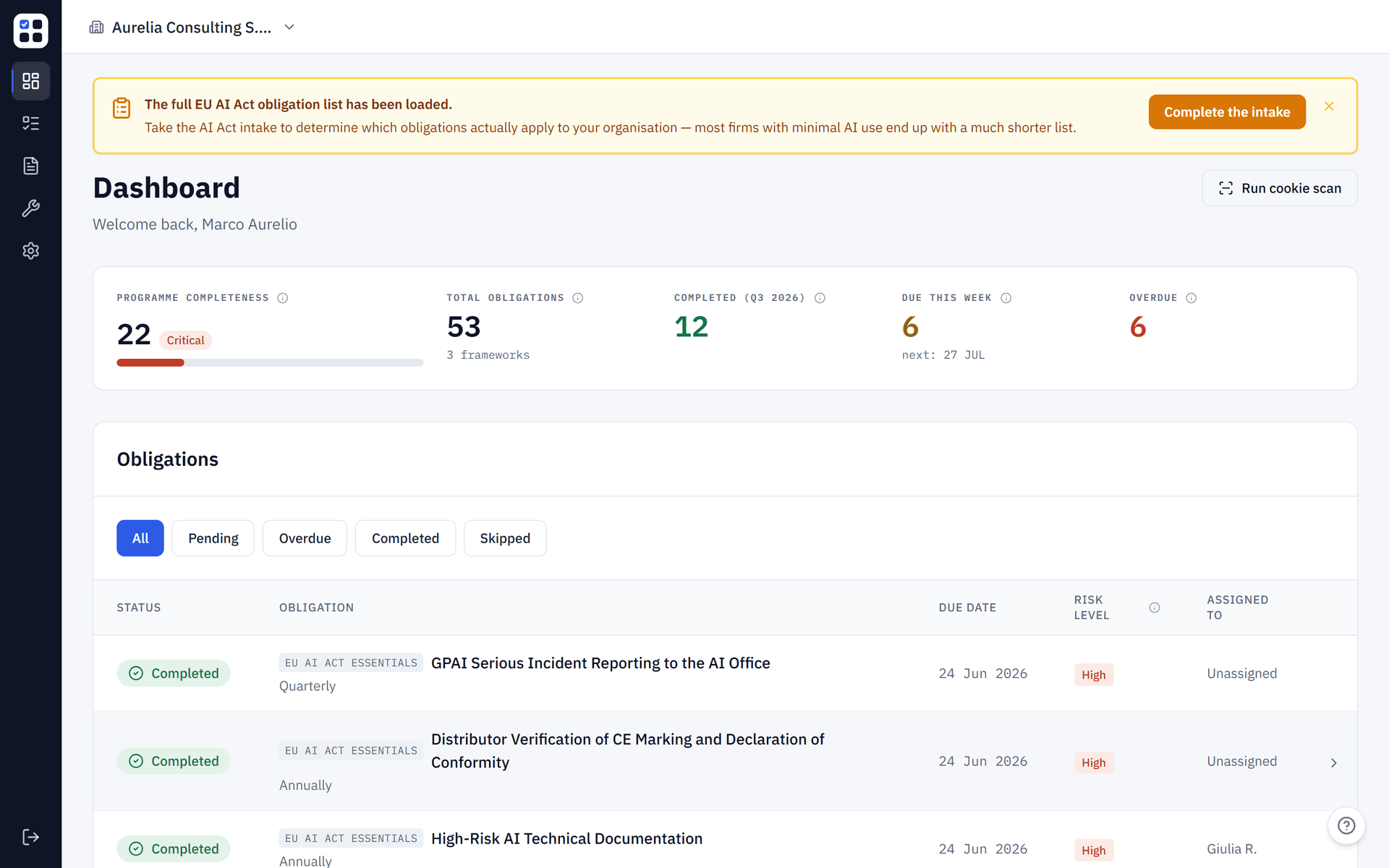
Overview cards
At the top of the dashboard, four stat cards give you an instant compliance health check:
| Card | What it shows |
|---|---|
| Total obligations | The total number of obligations across all frameworks in your active organisation |
| Completed | Obligations marked as completed in the current quarter |
| Due this week | Obligations with a due date within the next 7 days |
| Overdue | Obligations past their due date that are not yet completed |
Overdue obligations are highlighted in red. Address these first — they represent compliance gaps that could be flagged in an audit.
Obligations table
Below the stat cards is a filterable table showing all your organisation's obligations. Each row shows:
- Status — colour-coded badge: Completed, In progress, Overdue, Skipped, or Not started
- Obligation — the obligation title and recurrence frequency (monthly, quarterly, annual)
- Due date — formatted as day/month/year
- Risk level — High (red), Medium (yellow), or Low (green)
- Assigned to — the team member responsible, or "Unassigned"
Click any row to open the obligation detail view where you can update its status, add notes, and upload evidence.
Filtering obligations
Use the filter buttons above the table to narrow down what you see:
- All — shows every obligation
- Pending — not yet completed or skipped
- Overdue — past due date and not completed
- Completed — finished this period
- Skipped — intentionally marked as not applicable
Programme Completeness Gauge
The circular gauge on the dashboard shows your programme completeness score from 0 to 100 — how far you've progressed through your tracked obligations, not a legal compliance determination. Click the gauge to open the Score Breakdown slide-over, which details how each obligation contributes to the total. For how the score is calculated and how the assessment wizard shapes your obligation set, see Risk Assessment & Scoring.
Your score updates automatically when you complete obligations or upload evidence. The gauge uses a four-band colour system:
| Range | Band | Colour |
|---|---|---|
| 0 -- 30 | Critical | Red |
| 31 -- 60 | Needs Attention | Orange |
| 61 -- 85 | On Track | Amber |
| 86 -- 100 | Strong | Green |
If your score shows 0, complete your first obligation to start building your score. If the gauge reads N/A, all obligations are currently skipped — retake the assessment to refresh your frameworks and score.
Assessment Card
When no assessment has been completed, the dashboard shows a card prompting you to take the assessment. Click Complete Assessment to launch the 8-step wizard that captures your organisation's profile, data-processing activities, and regulatory context.
After completion, your risk score appears on the dashboard and the relevant compliance frameworks are activated automatically.
AI Incidents widget
The dashboard shows an AI Incidents widget when you have open AI incidents under EU AI Act Article 73. It lists your open incidents with the soonest deadline first and a coloured countdown badge for each — red when 24 hours or fewer remain or the deadline has passed, amber within 72 hours, gray otherwise. The widget is hidden when you have no open incidents. See AI Incident register for how to log an incident, the statutory windows, and the difference between logging and notifying the authority.
Daily reminders
When an admin loads the dashboard, ObligoBoard silently triggers a background job to send any pending due-date reminder emails for the day. This ensures reminders are delivered even if the scheduled cron runs at an inconvenient time.