White-label & custom domain
Configure agency branding (logo, primary colour, footer HTML) and point a custom domain at your sub-account workspaces.
The Agency tier lets you replace ObligoBoard's default branding with your own across every sub-account workspace your clients log into. Branding is configured once on the agency parent account and inherited automatically by every sub-account — you don't have to repeat the work for each client.
All branding controls described here ship at Agency Starter and up — including the custom domain. Higher-tier reskinning options (full HTML/CSS shell, ObligoBoard branding fully removed from sign-in) are part of Agency Enterprise — contact sales for scope.
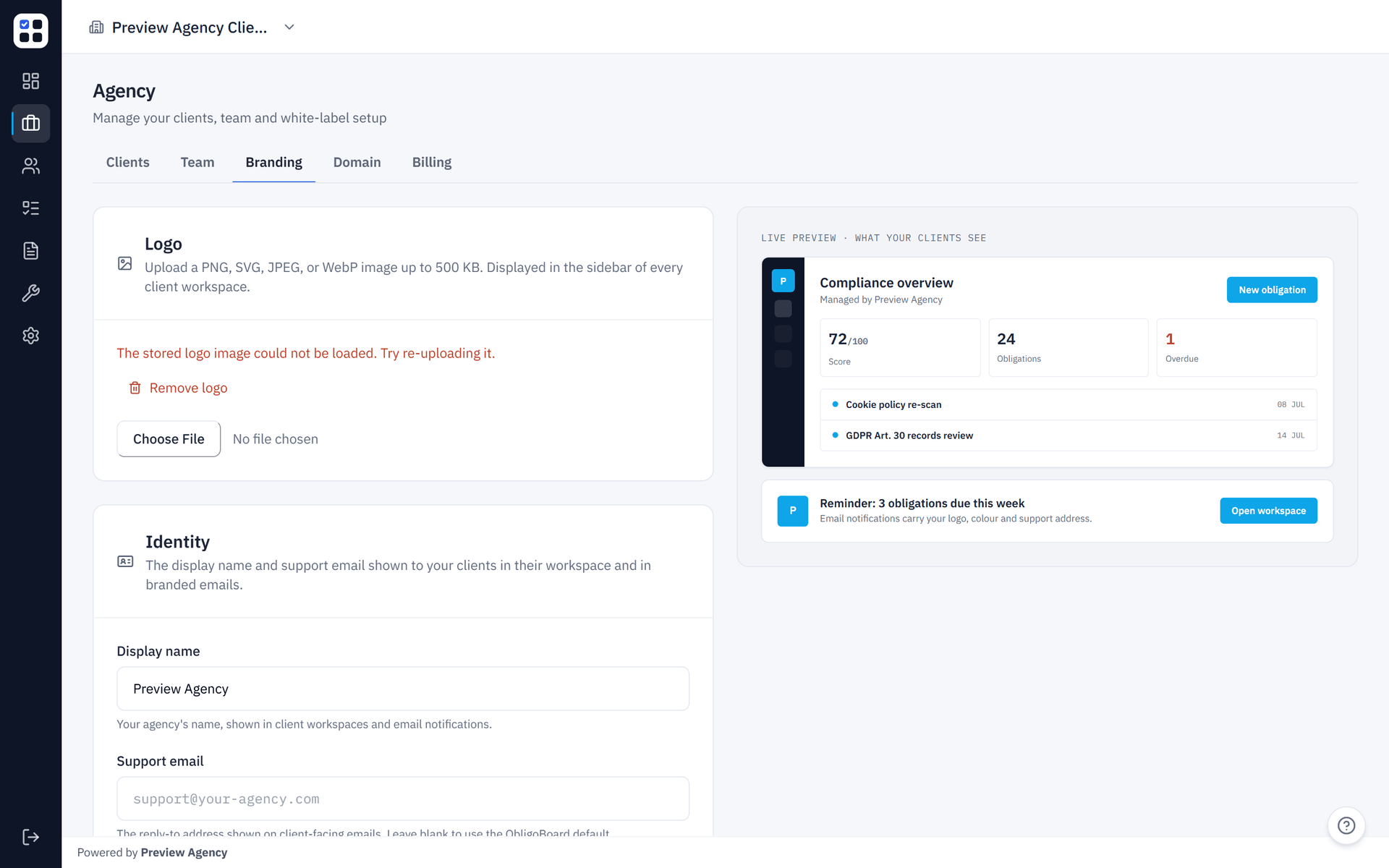
What's bundled at Agency Starter+
The four white-label controls available on every paid Agency-tier subscription:
| Control | Where to set it | What it affects |
|---|---|---|
| Logo | /agency/branding (PNG/SVG/JPEG/WebP, max 500 KB) | Sidebar header on every sub-account workspace |
| Primary colour | /agency/branding (hex #RRGGBB) | Active-nav accent stripe in sidebar |
| Footer HTML | /agency/branding (sanitised against an allow-list, 5,000 char cap) | Bottom of every authenticated sub-account page |
| Custom domain | /agency/domain (CNAME wizard with auto-TLS) | The hostname your clients sign in at |
Setting your branding
Open /agency/branding
From the sidebar, click Agency branding (visible to agency_owner). Other agency members can read the page but the form is disabled with a read-only notice.
Upload a logo
Click the logo uploader and pick a file. Supported formats are PNG, SVG, JPEG, and WebP, up to 500 KB. The upload uses Vercel Blob client-direct, so the binary doesn't pass through ObligoBoard's API server.
Pick your primary colour
Use the colour picker or paste a hex value (#RRGGBB). The colour shows up as the active-state accent on the sidebar nav inside every sub-account.
Write your footer
Plain text or a small subset of HTML — <a>, <b>, <i>, <p>, <br> are allowed; everything else (including <script>, <iframe>, style= attributes, all event handlers) is stripped server-side. URLs must use http, https, or mailto schemes; target="_blank" links are auto-rewritten with rel="noopener noreferrer".
Save
Click Save. The change is live immediately and propagates to every sub-account workspace under your agency on the next page load.
The footer sanitiser is the authoritative XSS-defence point — it runs on every write regardless of what the client sent. Your saved footer reflects what actually persisted; anything stripped won't render. Don't paste rich Word-document HTML and expect it to survive.
Configuring a custom domain
Open /agency/domain
From the sidebar, click Custom domain. The page is owner-only — admin/member callers receive a 404.
Enter your hostname
Pick a hostname under a domain you control — for example compliance.studiorossi.it. At least three dot-separated labels are required (so compliance.studiorossi.it works, but apex domains like studiorossi.it are not yet supported). Reserved suffixes (obligoboard.com, vercel.app, etc.) are rejected.
Add the CNAME at your DNS provider
ObligoBoard surfaces the exact CNAME record you need to add (host + target). Paste it into your registrar / DNS host (Cloudflare, Route 53, etc.).
Click 'Verify DNS'
ObligoBoard polls until the CNAME resolves correctly, then provisions a TLS certificate via Vercel's domains API. Verification typically takes between a minute and an hour depending on your DNS provider's propagation speed.
Done — clients can sign in at the new hostname
Your sub-account users can now reach their workspace at https://<your-hostname>/dashboard. The original obligoboard.com URL keeps working as a fallback.
TLS provisioning is automatic — there's nothing to install on your side. ObligoBoard issues a free Let's Encrypt-style certificate via Vercel and renews it automatically before expiry.
What end-clients see vs what stays branded ObligoBoard
When a client signs in to one of your sub-accounts:
- Your logo replaces the ObligoBoard wordmark in the sidebar.
- Your primary colour accents the active nav item.
- Your footer appears at the bottom of every page.
- If you've configured a custom domain, your hostname is what the client types into the address bar.
What still surfaces ObligoBoard branding (intentional, by tier):
- The ObligoBoard logo on the sign-in page (Agency Enterprise only removes this).
- Outbound transactional emails (invitation emails, trial-expiry emails, etc.) come from ObligoBoard's domain — co-branded white-label email is on the Enterprise roadmap.
- Generated Privacy Policy and Cookie Policy PDFs include the ObligoBoard footer credit.
- Documentation links inside the product (this docs site itself) point at
obligoboard.com/docs.
Agency Enterprise — extended white-label
Agency Enterprise customers get scope beyond what's controllable from /agency/branding and /agency/domain:
- Full HTML/CSS reskin of the sub-account shell.
- ObligoBoard branding removed from the sign-in page.
- Co-branded transactional emails (sender domain on your hostname).
- Custom legal-document footers in generated policy PDFs.
- Bring-your-own SSL certificate options (in addition to the auto-TLS flow).
These are bespoke per agreement — contact sales (hello@obligoboard.com) to scope.
What's next
- Agency setup — provisioning, roles, archiving.
- Agency billing & slots — the pricing brackets that come with each tier.
- Agency FAQ — quick answers including custom-domain edge cases.