Cookie Policy Generator
Declare your website's cookies and generate an accurate cookie policy document.
The Cookie Policy Generator helps you document all the cookies your website uses and produce an accurate, structured cookie policy. It combines a manual declaration wizard with automated cookie scanning to keep your policy up to date.
Overview
Websites that use cookies must disclose what cookies are set, why they are used, and how visitors can manage their preferences. The generator walks you through declaring your cookies and produces a formatted policy ready to publish.
The Cookie Wizard
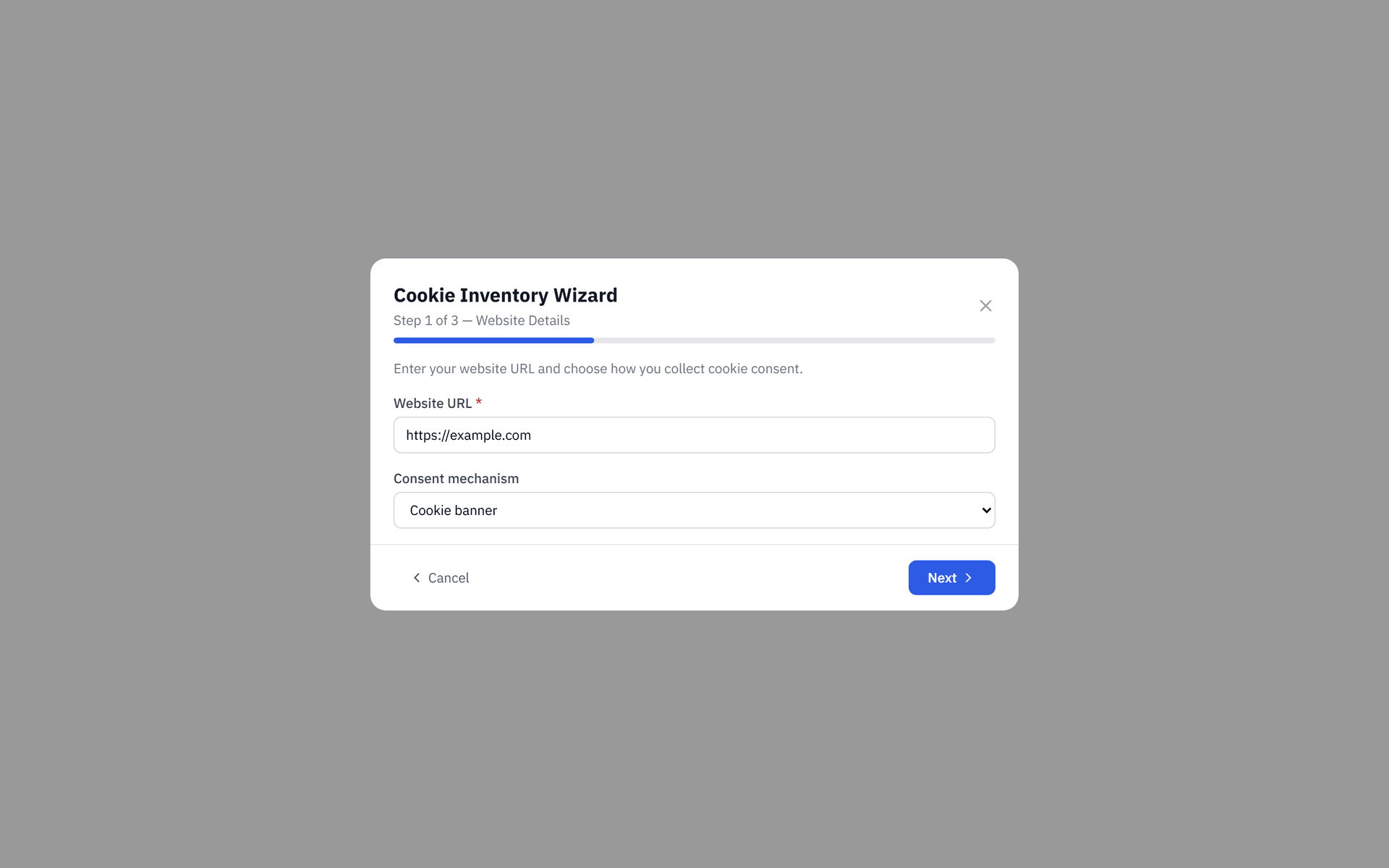
The wizard collects your cookie information in 3 steps.
Website and consent mechanism
Enter your website URL and select the consent mechanism you use (e.g. cookie banner, consent management platform, or none). This information appears in the introductory section of the generated policy.
Third-party tools
Select which third-party tools and services your website uses from ObligoBoard's cookie reference database. Each tool automatically populates the relevant cookies, their categories, and expiry periods.
Custom cookies
Add any first-party or custom cookies that are not covered by the pre-configured tools. For each custom cookie, specify the name, purpose, category, and retention period.
Cookie reference database
ObligoBoard includes a database of 23 pre-configured tools across 8 categories. When you select a tool, all its known cookies are added to your policy automatically — no need to research individual cookie names and lifetimes.
Categories
| Category | Typical use | Examples |
|---|---|---|
| Essential | Required for the website to function | Session management, consent management (Complianz) |
| Analytics | Help you understand how visitors use your site | Google Analytics, Plausible, Matomo |
| Marketing | Deliver relevant advertising | Google Ads, Facebook Pixel, LinkedIn Insight |
| Customer Support | Enable live chat and support features | Intercom, Zendesk, Crisp |
| CRM & Email | Manage customer relationships and email marketing | HubSpot, Salesforce |
| Payments | Process secure payments | Stripe, PayPal |
| Embedded Media | Enable video and media content | YouTube embeds, Vimeo |
| Security | Protect your site from fraud and abuse | CAPTCHA providers, bot detection |
If a tool you use is not in the database, add its cookies manually in the Custom cookies step. You can specify the exact cookie name, purpose, and expiry.
Cookie scanning
ObligoBoard can scan your website to detect cookies automatically and compare them against your declared list.
Running a scan
From the Cookie Policy page, click Scan website. The scanner visits your website and records all cookies set during the page load.
Reviewing scan results
After a scan completes, ObligoBoard shows a diff view with three categories:
- Added — cookies found on your site that are not in your current declaration (you should add these)
- Removed — cookies in your declaration that were not found on your site (consider removing these)
- Unchanged — cookies that match between your declaration and the scan
Click Accept changes to update your declaration based on the scan results, or dismiss individual items.
Stale scan banner
If more than 90 days have passed since your last scan, ObligoBoard displays a banner reminding you to rescan. Cookie configurations change as you add or remove third-party tools — regular scanning keeps your policy accurate.
The cookie scanner may not detect all cookies — especially those set only after user interaction (e.g. clicking a button or submitting a form). Always cross-reference scan results with your known third-party integrations.
Scanner availability
The cookie scanning feature requires a server-side scanning service. If the scanner is temporarily unavailable, ObligoBoard displays a Scanner not yet available message. You can still create and manage your cookie policy manually using the wizard — scanning is an optional verification tool.
Generating the policy
Once your cookie declarations are complete, click Save & Generate to produce the formatted cookie policy document. The policy includes:
- A list of all declared cookies grouped by category
- Purpose and retention period for each cookie
- Instructions for visitors on how to manage cookie preferences
- Details about your consent mechanism
Like the Privacy Policy Generator, each generation creates a new version. Previous versions are preserved for your audit trail.