Team management
Invite colleagues by email, understand the Owner, Admin, and Member roles, and delegate obligations to the people responsible for them.
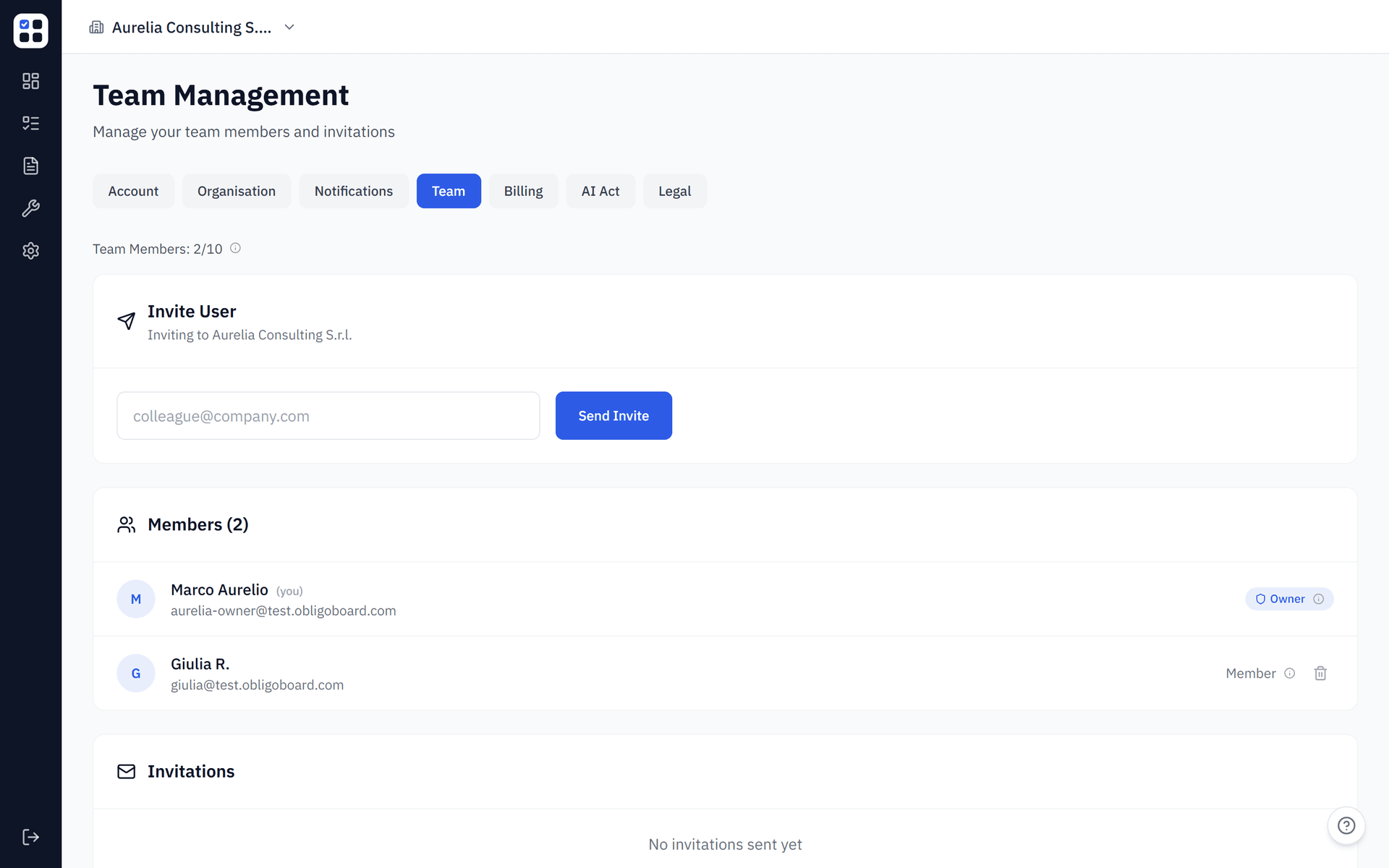
ObligoBoard is built for teams. You can invite colleagues by email, and delegate specific obligations to the people responsible for fulfilling them. This page explains the roles, how invitations work, and how to manage your team from Settings → Team.
User roles
Every member of an organisation has one of three roles:
| Role | Access level |
|---|---|
| Owner | The person who created the organisation. Has full access — everything an Admin can do — and is the account owner for billing and legal purposes (for example, signing the Data Processing Agreement). Every organisation has exactly one Owner, and the Owner cannot be removed. |
| Admin | Full access — manage frameworks, invite and remove team members, edit all obligations, generate reports, and manage billing. |
| Member | Can update obligation statuses, add notes, upload evidence, and be assigned obligations. Cannot manage the team or billing. |
Roles are assigned automatically and are fixed today. The person who creates an organisation becomes its Owner. Everyone you invite joins as a Member. There is currently no in-app control to change a member's role, or to promote a Member to Admin or Owner — you will not find a role dropdown, a "promote" button, or a role picker on the invite form. Admin-level access beyond the Owner is provided through Agency plans, where agency administrators manage client organisations on your behalf.
Inviting team members
Invitations are sent by email. You do not choose a role when inviting — everyone you invite joins as a Member.
Go to Settings → Team
In the sidebar, click Settings, then select the Team tab. The Team tab is available to Admins and the Owner.
Enter the email address
In the Invite user panel, type the email address of the person you want to invite.
Send the invitation
Click Send invite. The invitee receives an email with a link to join your organisation. The invite link is valid for 7 days.
Accepting an invitation
When a colleague invites you to join their organisation:
Check your email
Look for an invitation email from ObligoBoard. The link is valid for 7 days.
Click the invitation link
The link takes you to ObligoBoard's sign-in page. If you don't already have an account, you'll be prompted to create one (name and password).
You're in
After signing in, you'll be added to the organisation as a Member. If you already have an account, you can switch between organisations using the organisation selector in the sidebar.
Managing team members
From Settings → Team, Admins and the Owner can:
- Remove a member — click the remove button next to their name to revoke access immediately. You cannot remove yourself, and the Owner cannot be removed.
- Cancel a pending invitation — for invitations that haven't been accepted yet, click the cancel button next to the entry. This invalidates the invite link.
Each member's role is shown next to their name (Owner or Member), but roles cannot be edited here — see the note under User roles.
Removing a team member immediately revokes their access. Obligations assigned to them remain in the system but are shown as unassigned. Reassign them as needed.
There is no "resend" control for invitations. If an invitation has expired (after 7 days) or you cancelled it by mistake, simply send a fresh invitation to the same email address.
Assigning obligations to team members
Once your team is set up, you can assign obligations directly from the obligation detail view:
Open an obligation
Click any obligation from the Dashboard or Obligations page.
Use the 'Assignee' field
In the obligation's Details panel, open the Assignee dropdown and select the team member responsible for this obligation. Choose Unassigned to clear the assignment.
Save
The assignment is saved immediately. The assigned member will receive an email notification (if notifications are enabled).
Switching organisations
If you belong to multiple organisations, use the organisation selector in the sidebar to switch between them. Each organisation has its own obligations, frameworks, and team members — invitations are scoped per organisation, so a member you invite to one organisation doesn't automatically get access to others. For fully isolated client sub-accounts where each client has separate access and you operate at an agency level, see Agency plans. Your last active organisation is remembered on your next login.
Seat limits
The number of team members you can have depends on your plan. Both current members and pending (unaccepted, unexpired) invitations count toward your seat limit:
| Plan | Seat limit |
|---|---|
| Starter | Up to 5 team members per organisation |
| Pro | Up to 10 team members per organisation |
When you reach your plan's seat limit, the invite form is disabled and an upgrade prompt is shown. Upgrade from Settings → Billing to add more seats.