Evidence pack
Generate a downloadable PDF that compiles the obligations and evidence you have recorded in ObligoBoard into a single formatted export for your own records and review.
An Evidence Pack is a structured PDF that compiles the obligations you track and the evidence you have uploaded into a single formatted document — a snapshot of the records you keep in ObligoBoard, organised for your own review. It is your self-assessment record, not an attestation, certification, or compliance verdict from ObligoBoard.
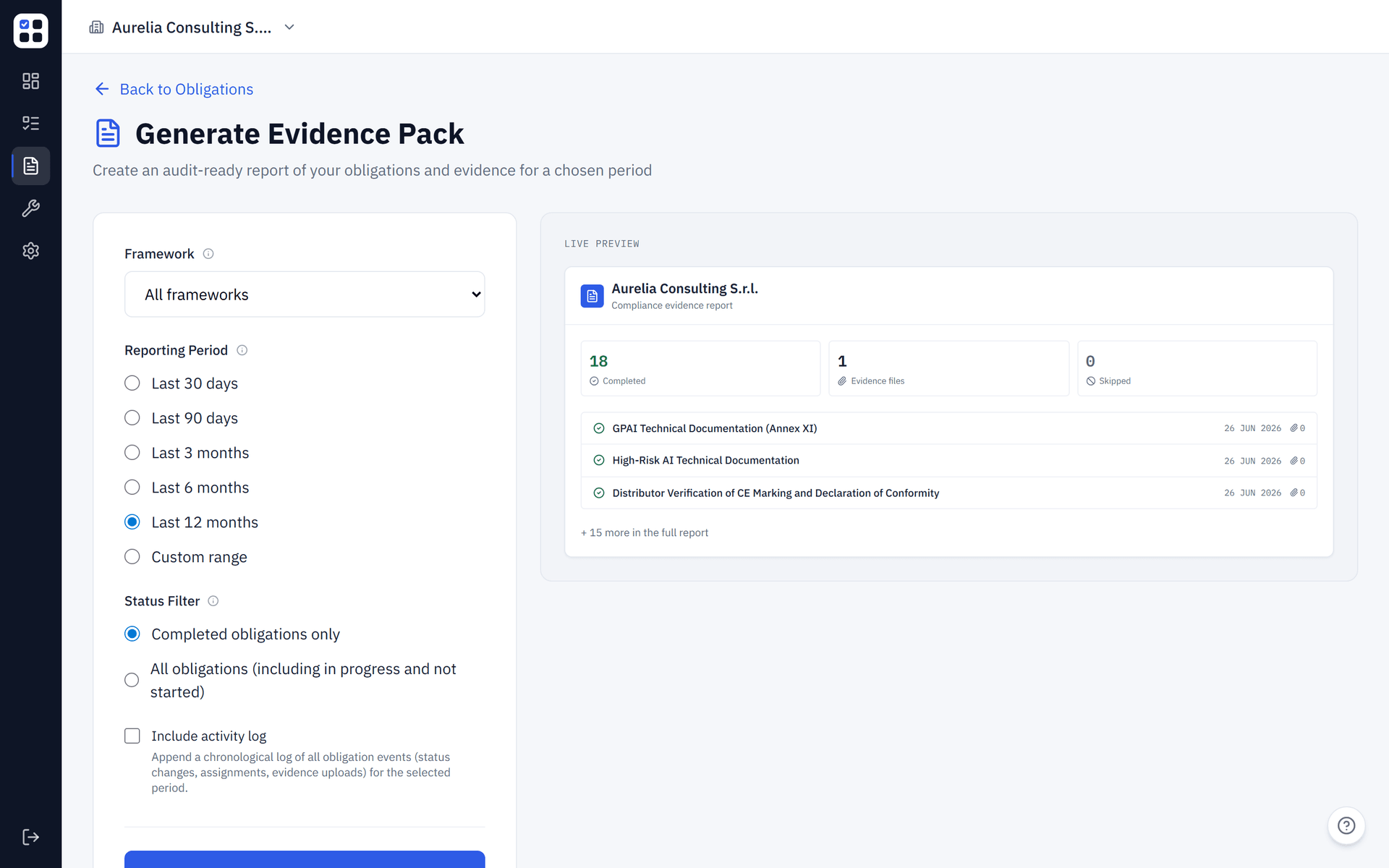
What's included
A generated Evidence Pack contains:
- Cover page — organisation name, report period, generation date
- Executive summary — completion rate, total obligations, high-risk items addressed
- Obligation-by-obligation breakdown — status, due date, assignee, notes, and evidence links
- Uploaded documents — references to all evidence files uploaded against each obligation
- Framework overview — breakdown by compliance framework
Generating an Evidence Pack
Go to Reports
Click Reports in the sidebar, or navigate directly to /reports/evidence-pack.
Select a framework
Use the Framework dropdown to include obligations from a specific framework, or select All frameworks to include everything.
Set the reporting period
Choose from preset periods (Last 3 months, Last 6 months, Last 12 months) or set a custom date range using the date pickers.
Filter by status
Select which obligation statuses to include — completed only, or all statuses including in-progress and overdue.
Generate and download
Click Generate Evidence Pack. The report is created in seconds and downloaded automatically as a PDF.
Reporting period options
| Period | Use case |
|---|---|
| Last 3 months | Quarterly internal review |
| Last 6 months | Mid-year audit preparation |
| Last 12 months | Annual compliance report |
| Custom range | Specific regulatory filing period or external audit window |
The reporting period filters by completion date for completed obligations and due date for all others.
Status filters
By default, only completed obligations are included in the Evidence Pack. This is the recommended setting for external audits.
For internal reviews, you may want to include all statuses to get a complete picture — including overdue and in-progress obligations.
Tips for a strong Evidence Pack
- Upload evidence before generating — Obligations with uploaded documents carry significantly more weight in an audit than those with only a status update.
- Add notes — Contextual notes on each obligation (e.g. "Reviewed by DPO on 10 Jan") make the report more credible.
- Generate regularly — Create a fresh Evidence Pack at the end of each quarter as part of your review cycle.
- Use the custom date range — If your fiscal year doesn't match the calendar year, use a custom range to match your reporting period exactly.
Evidence Packs are generated entirely from data in your ObligoBoard account — no manual compilation needed.